What Is On-Page SEO? A Complete Beginner’s Guide
Imagine Sara, who runs a small online shop. She spends a weekend writing a blog post about caring for leather bags, hits publish, and waits. A week later, almost nobody has visited. The writing is decent, so what went wrong? Often, the page simply isn’t clear enough for search engines or for readers scanning the results.
That’s where on-page SEO comes in. It’s the practice of improving the parts of a webpage you control so that both people and search engines can understand it. In this guide, you’ll learn what on-page SEO is, why it matters, which elements deserve your attention, and how to follow a simple process. There are no shortcuts or ranking promises here, just practical fundamentals.
What Is On-Page SEO?
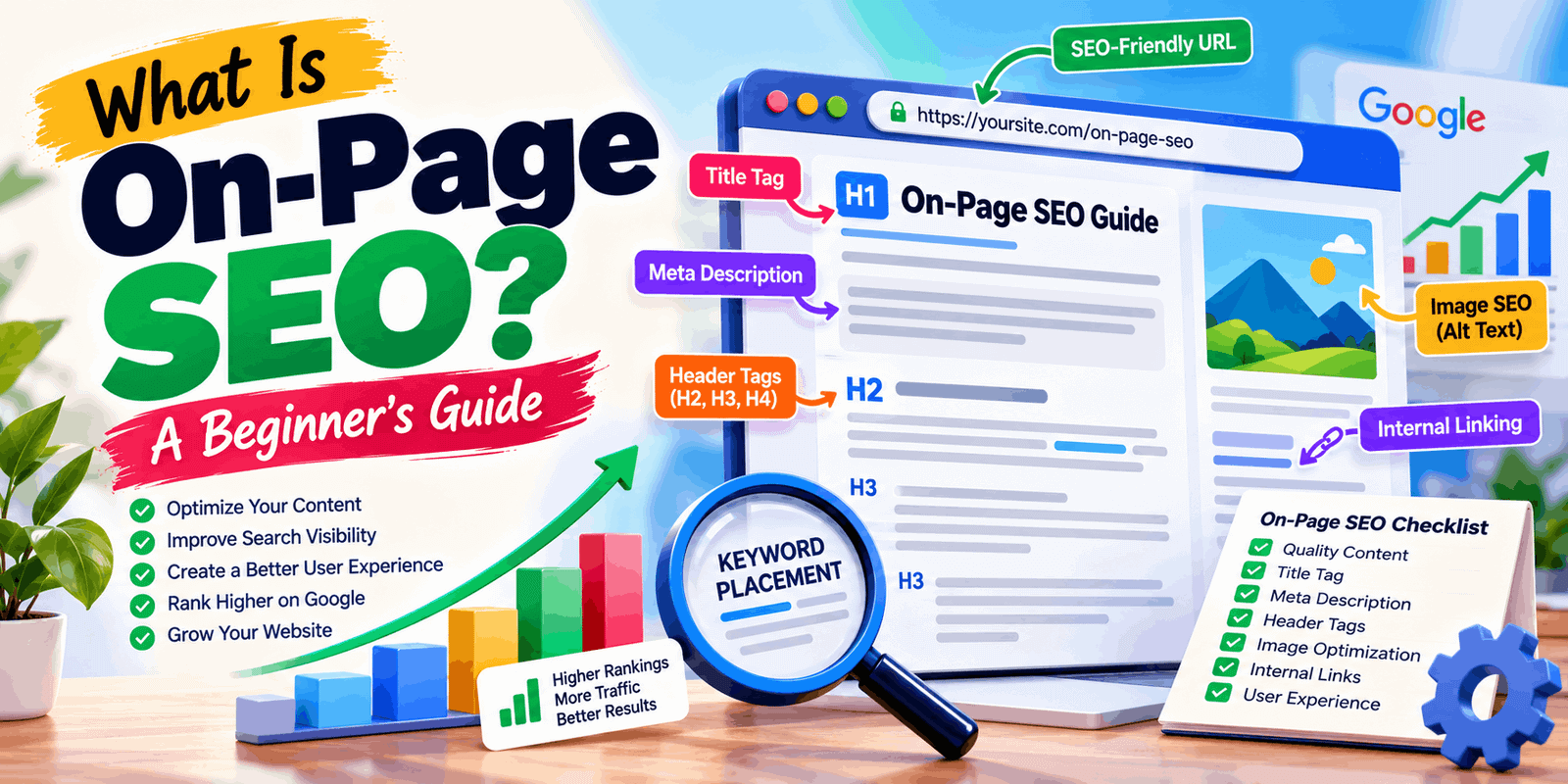
On-page SEO means optimizing the content and HTML elements of a single webpage so search engines can interpret it and visitors can use it easily. It covers things you control directly: your text, title, headings, URL, images, and links to other pages on your site.
There’s an important balance to strike. Optimizing for search engines means making your topic clear. Making a page useful for visitors means actually answering their question. The best pages do both, and when the two conflict, readers should come first.
For example, say you write a beginner’s post about brewing cold coffee. You’d give it a clear title, break the steps into sections with headings, use a short URL like /cold-coffee-guide, and add descriptive alt text to your photos.
Why Is On-Page SEO Important?
Search engines can’t read minds. They rely on signals within your page to work out what it’s about. Good on-page SEO can help you:
- Communicate your topic clearly so search engines understand what the page covers
- Match search intent, meaning the reason behind a search, such as learning, comparing, or buying
- Organize your content so it’s easy to scan and follow
- Create a better user experience so visitors find answers quickly
- Support organic search visibility over time
Be realistic, though. On-page SEO alone doesn’t guarantee better search rankings. Results depend on competition, content quality, your site’s overall reputation, and other factors, and improvements usually take time.
The Most Important Elements of On-Page SEO
1. High-Quality, Helpful Content
Content is the foundation. Google’s guidance encourages people-first content: original, accurate, and written to help readers rather than to manipulate rankings. Ask yourself whether your page fully answers what a visitor came for. Someone searching “how to wash a wool sweater” wants clear steps, not a vague overview. Add your own knowledge, practical examples, and up-to-date details.
2. SEO-Friendly Title Tags
A title tag is the clickable headline that often appears in search results. Keep it descriptive, place your main topic near the beginning, and keep it short enough that it isn’t cut off. A clear example: “How to Wash a Wool Sweater Without Shrinking It.” Never promise something the page doesn’t deliver.
3. Compelling Meta Descriptions
A meta description is a short summary of your page. Write one or two natural sentences explaining what readers will learn. Google may show a different snippet depending on the search, so treat your meta description as a helpful suggestion, not a guarantee.
4. Proper Heading Structure
Use one H1 as your main page title. Use H2s for major sections and H3s for points within them. Think of it like a book’s table of contents: someone skimming only your headings should still understand the flow of the article.
5. SEO-Friendly URLs
Short and descriptive beats long and confusing. Compare yoursite.com/wool-sweater-care with yoursite.com/?p=48291&cat=7/final-version-new. The first tells everyone what to expect. Use lowercase words separated by hyphens.
6. Natural Keyword Placement
Include your main keyword where it fits naturally: the title, H1, opening paragraph, a relevant heading, and the conclusion. Add related phrases too, such as “wool sweater care” or “washing wool.” Never repeat a phrase just to hit a number. That’s keyword stuffing, and it makes your writing unpleasant to read. If a sentence sounds awkward aloud, rewrite it.
7. Internal Linking
Internal links associate different pages within the same website. They help readers find related articles and help search engines understand your site’s content structure. Use descriptive anchor text like “beginner keyword research guide” instead of “click here,” and link only where it genuinely helps.
8. Image Optimization
Images make pages more engaging, but they need attention:
- Use descriptive filenames (wool-sweater-hand-washing.jpg, not IMG_4021.jpg).
- Write alt text that plainly describes the image to help screen-reader users and search engines.
- Compress files so pages load faster.
- Choose suitable formats: JPEG for photos, PNG for graphics needing transparency, and WebP for smaller files where supported.
5b. Mobile-Friendly Design and Page Experience
9. Mobile-Friendly Design and Page Experience
Many visitors browse on phones, so text should be readable, buttons easy to tap, and pages reasonably quick to load. These are broader page-experience factors rather than content-focused on-page SEO, but they shape how visitors experience your content. Free tools like Google Search Console and PageSpeed Insights can highlight problems.
How to Do On-Page SEO: A Simple Step-by-Step Guide
- Choose a relevant primary keyword. Pick a phrase your audience might actually search, such as “on-page SEO checklist.”
2. Understand search intent. Search the phrase yourself. Are the results guides, lists, or product pages? That shows what people expect.
3. Create an original outline. Plan headings that answer the main questions a reader would have.
4. Write a descriptive title and organize headings. Make sure your H1, H2s, and H3s follow a logical order.
5. Optimize the URL, images, and internal links. Shorten the URL, name and compress images, and link to related pages.
6. Review readability, mobile usability, and speed. Read the page on your phone and fix anything awkward.
7. Publish and monitor. Check performance in Google Search Console over the following weeks and improve the page as you learn.
On-Page SEO vs. Off-Page SEO
The two work together. On-page SEO is about what’s on your webpage, while off-page SEO is about signals from outside your site.
|
On-Page SEO |
Off-Page SEO |
|
|
Where it happens |
On your own webpage |
Elsewhere on the web |
|
Main focus |
Content, titles, headings, URLs, images, internal links |
Backlinks, mentions, reputation |
|
Example |
Improving a blog post’s structure and title |
Earning a relevant link from another website |
|
Your control |
Mostly direct |
Partial |
Common On-Page SEO Mistakes to Avoid
- Keyword stuffing. Write for humans first, and use keywords only where they fit.
- Duplicate or thin content. Make every page distinct, and add real detail and examples.
- Misleading titles. Make sure the page delivers what the headline suggests.
- Ignoring search intent. Check what searchers actually want before you write.
- Poor internal linking. Add a few relevant links to related pages on your site.
- Missing image alt text. Describe each meaningful image in plain language.
- Unclear heading structure. Use one H1 and organize the rest logically.
A good habit is to reread your draft as a first-time visitor. If anything feels confusing or repetitive, fix it before publishing.
A Simple On-Page SEO Checklist
Before you hit publish, confirm that:
☐ The page answers the reader’s question and matches search intent
☐ The title tag clearly reflects the main topic of the page
☐ The meta description is accurate and inviting
☐ There is one H1, with logical H2 and H3 headings
☐ The URL is short, lowercase, and descriptive
☐ The main keyword appears naturally in key places
☐ Relevant internal links are included
☐ Images have descriptive filenames, alt text, and compressed sizes
☐ The page is mobile-friendly and loads quickly on mobile devices
☐ You’ve proofread for accuracy and clarity
Final Thoughts
So, what is on-page SEO in practice? It’s making each page clear, organized, and genuinely useful. Focus on helpful content, a logical structure, relevant keywords used naturally, and steady improvement. Results take time and vary, but strong fundamentals give your pages the best chance to be understood.
Ready to keep learning? Explore more beginner-friendly SEO guides on RS Valley and build your skills one step at a time.
Frequently Asked Questions
What is on-page SEO in simple words?
It’s the process of improving the parts of a webpage you control, like content, titles, headings, URLs, and images, so search engines and visitors can easily understand what the page is about.
What is an example of on-page SEO?
Rewriting a vague blog title into a clear one, adding logical headings, shortening the URL, and writing descriptive alt text for images are all everyday examples of on-page SEO.
Is on-page SEO important for beginners?
Yes. It’s one of the most approachable parts of SEO because you control it directly. Learning the basics early helps you build clear, well-organized pages from the start.
On-Page vs. Off-Page SEO: What’s the Difference?
On-page SEO happens on your own webpage, such as content and structure. Off-page SEO focuses on external signals, especially backlinks from other websites.
How Quickly Can On-Page SEO Improvements Start Showing Results?
There’s no fixed timeline. Results depend on competition, content quality, and your site’s overall reputation. Many site owners review progress over weeks or months rather than days.
Can I do on-page SEO myself?
Absolutely. The basics don’t require coding skills. With a checklist, a clear understanding of search intent, and helpful content, beginners can optimize their own pages.
Common SEO myths