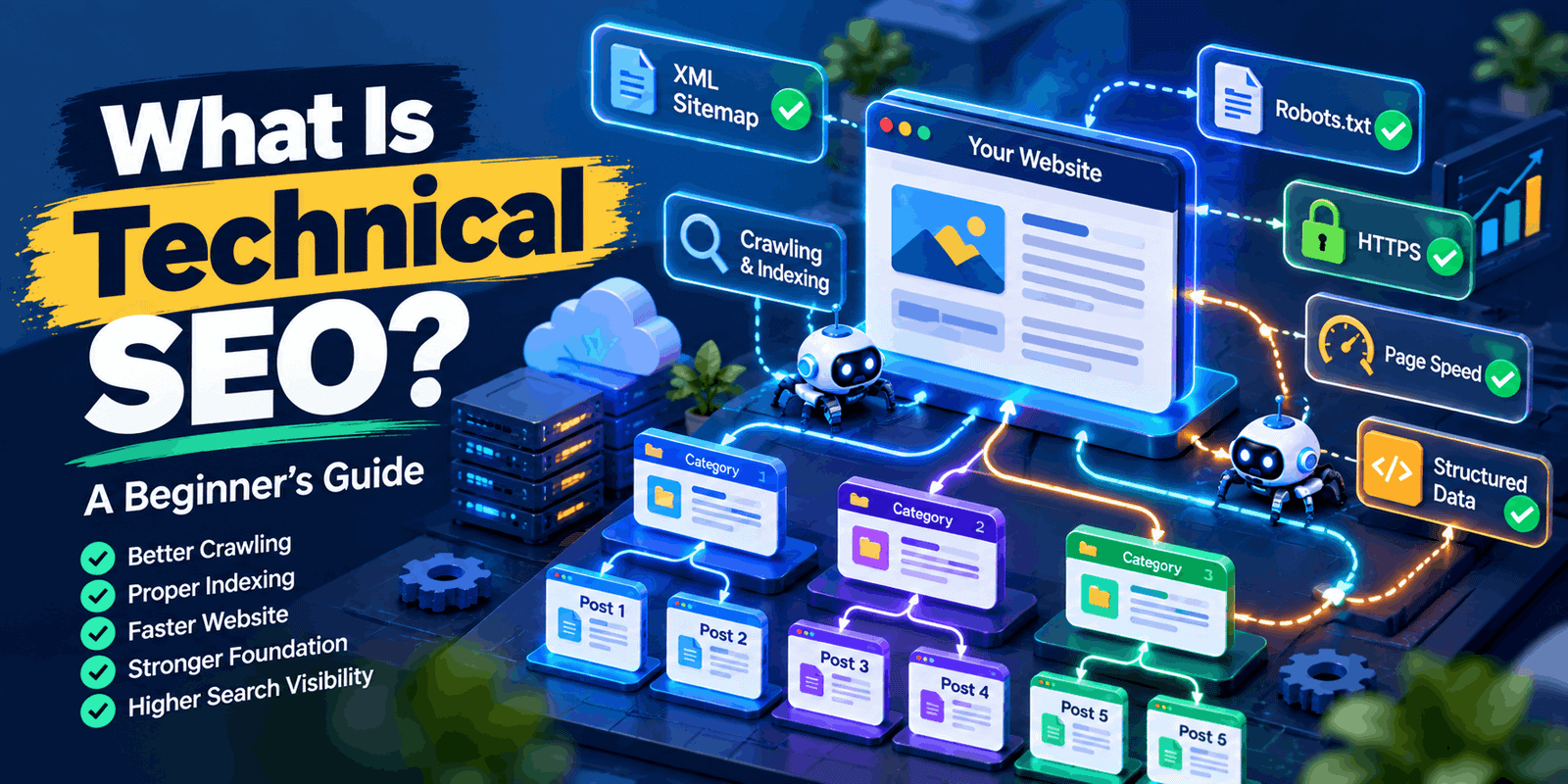
What Is Technical SEO? A Beginner’s Guide
Many people believe SEO is mainly about keywords and backlinks. But even excellent content can struggle if search engines cannot reach it, understand it, or store it properly. This is where technical SEO plays an important role. It gives your website the foundation search engines need to crawl, understand, and index your pages effectively. In this beginner’s guide, you will learn what technical SEO is, why it matters, which elements to focus on, how to get started, and which free tools can help. There are no ranking promises here, just practical steps that make your website easier for people and search engines to use.
What Is Technical SEO?
What is SEO? Technical SEO is the practice of improving the technical parts of a website that affect crawling, indexing, accessibility, performance, and search visibility. Simply put, it helps search engines discover your pages and ensures visitors can use your site smoothly.
Think of your website as a shop in a large shopping centre. Your content is the products. But if the doors are locked, the signs are missing, and the aisles are confusing, visitors will struggle. Technical SEO unlocks the doors, adds clear signs, and organises the aisles.
It helps to know how it differs from the other two main areas:
- On-page SEO focuses on the content and elements of individual pages, such as headings and title tags.
- Off-page SEO focuses on signals from outside your site, such as backlinks and brand mentions.
- Technical SEO focuses on the website’s underlying setup and infrastructure.
Why Is Technical SEO Important?
Technical problems can quietly hold a good website back. A solid foundation helps in several ways:
- Crawling and indexing: Search engines can reach and store your pages.
- Discovering important pages: A clear structure points search engines to the pages that matter most.
- Accessibility and mobile usability: More people can use your site, on any device.
- Performance and user experience: Pages load smoothly and feel stable.
- Understanding structure: Search engines can see how your pages relate to each other.
Technical SEO does not guarantee higher rankings by itself. It removes obstacles. Rankings also depend on helpful content, relevance to what people search for, and authority.
Important Technical SEO Elements
1. Website Crawlability
Crawling is how search engines discover pages. Automated programs, often called bots or crawlers, follow links from page to page. If a bot cannot reach an important page, that page may never appear in search results. For example, a product page that no other page links to is hard for crawlers to find.
2. Website Indexing
Indexing is the process of analyzing a webpage and storing it in a search engine’s database. Crawling is finding the page. Indexing is the process of saving a page so search engines can show it in search results. A page must be accessible and indexable to appear in search, though even then, appearing is never guaranteed.
3. XML Sitemap
An XML sitemap is a file that lists the pages you want search engines to discover. It can also include details such as when a page was last updated. Keeping it accurate helps search engines find new or changed content, especially on larger sites. A submitted sitemap doesn’t automatically mean your pages will be indexed.
4. Robots.txt
Robots.txt is a small text file that tells crawlers which areas of your site they should not crawl. Use it to manage crawling, such as keeping bots out of admin areas. Don’t rely on it to prevent a page from appearing in search results. A blocked URL can still be indexed if other websites link to it. To prevent indexing, use a noindex tag or password protection instead.
5. HTTPS and Website Security
HTTPS encrypts data between a visitor’s browser and your website, and browsers show a padlock for secure sites. It protects users when they log in, fill in forms, or make purchases. Modern websites are expected to use it, and browsers may warn visitors away from sites that do not.
6. Mobile-Friendly Website
Most people browse on smartphones, and Google primarily uses the mobile version of a site for indexing. Use a responsive design that works well on all screen sizes. Keep text readable without zooming, make buttons easy to tap, and keep navigation simple. Check that mobile visitors can see the same important content as desktop visitors.
7. Page Speed and Core Web Vitals
Nobody likes waiting for a slow page. Core Web Vitals are Google’s key measures of how users experience a website. They look at three things:
- Loading Performance: Measures how fast the main content loads.
- Interactivity: How quickly the page responds to clicks and taps.
- Visual Stability: Whether the page layout shifts unexpectedly while loading.
Google updates its metrics and thresholds from time to time, so check the current guidance on Google Search Central before judging your scores.
8. URL Structure
Clear, descriptive URLs help both visitors and search engines understand a page’s topic.
- Good: example.com/blog/technical-seo-guide
- Poor: example.com/index.php?id=84&cat=7x
Keep URLs short, readable, lowercase, and consistent.
9. Canonical Tags
Sometimes the same content appears at several URLs, such as with and without tracking parameters. This creates duplicate content. A canonical tag tells search engines which version is preferred. Canonical tags are a strong hint rather than a command, but they help consolidate signals onto one main page.
10. Structured Data
Structured data is code that labels your content so search engines understand its meaning. For example, it can show that a page is a recipe, a product, or an article. It may make a page eligible for rich results, such as review stars, but it never guarantees them. Make sure it accurately describes the content displayed on the page.
11. 404 Errors and Redirects
A 404 error appears when a page cannot be found, perhaps because it was deleted or the URL was mistyped. A few 404s are normal. Fix the ones that affect important pages. A redirect sends visitors from an old URL to a new one, which is useful after moving or renaming a page. Avoid redirect chains, where one URL sends people through several more, as they slow pages down.
12. Website Architecture and Internal Links
Good architecture is a logical structure with a clear path to every important page. Internal links connect your pages and help bots and visitors move around. A well-organised blog might look like this:
Home
Blog
SEO Basics (category)
What Is Technical SEO?
What Is Keyword Research?
Each article links to related guides, and the category page links back to each article.
How to Do Technical SEO: A Beginner-Friendly Process
- Check crawlability. Confirm that important pages are reachable through links and not blocked.
2. Review indexing status. Check which pages are indexed and find out why others aren’t.
3. Check your XML sitemap. Make sure it lists current, valid pages only.
4. Review robots.txt. Make sure it isn’t blocking any important pages or resources.
5. Confirm HTTPS works. Check for certificate errors and insecure content.
6. Test mobile usability. Open key pages on a phone.
7. Check page performance. Test slow pages and note the main issues.
8. Review URLs and redirects. Look for messy URLs and long redirect chains.
9. Find broken links and 404s. Fix or redirect those that matter.
10. Review canonical tags. Make sure each tag points to the right page.
11. Check structured data. Validate it where it is relevant.
12. Monitor regularly. Technical issues can return after updates or redesigns.
Technical SEO Tools for Beginners
You can do basic technical SEO with free tools. Paid tools are optional.
Common Technical SEO Mistakes
- Blocking important pages accidentally: Check noindex tags and robots.txt before launching.
- Incorrect robots.txt rules: Test changes before publishing them.
- Missing or outdated sitemap: Update it when you add or remove pages.
- Poor mobile usability: Test on real phones.
- Slow-loading pages: Compress images and remove unnecessary scripts.
- Broken links: Run regular checks.
- Incorrect redirects: Redirect to the most relevant page, not always the homepage.
- Duplicate URLs: Choose one preferred version.
- Incorrect canonical tags: Never point them at unrelated pages.
- Ignoring indexing problems: Read Search Console reports regularly.
- Poor website structure: Keep key pages within a few clicks of the homepage.
- Using structured data incorrectly: Follow Google’s guidelines and mark up only real content.
Technical SEO Checklist
☐ HTTPS is working
☐ Important pages are crawlable
☐ Important pages can be indexed
☐ XML sitemap is accurate
☐ Robots.txt is configured correctly
☐ Website works well on mobile
☐ Important pages load efficiently
☐ URLs are clean and descriptive
☐ Broken links are reviewed
☐ Redirects work correctly
☐ Canonical tags are appropriate
☐ Website structure is logical
☐ Search Console is monitored
Technical SEO, On-Page SEO, and Off-Page SEO: What’s the Difference?
|
SEO Type |
Main Focus Examples |
Examples |
|
Technical SEO |
Website technical foundation |
Crawlability, indexing, speed, sitemap |
|
On-Page SEO |
Content and webpage optimization |
Keywords, headings, title tags, internal links |
|
Off-Page SEO |
Signals outside the website |
Backlinks, brand mentions, digital PR |
All three work together. Technical SEO lets search engines access your site, on-page SEO makes each page useful, and off-page SEO builds trust.
Final Thoughts
Technical SEO makes your website easy to crawl, understand, and use. Start with the basics: working HTTPS, crawlable and indexable pages, a clean sitemap, mobile usability, and sensible structure. But remember that technical SEO is only one part of the picture. Success also depends on helpful content, search intent, on-page optimization, a good user experience, and relevant authority signals.
There’s no need to address every issue at the same time. Pick one issue, fix it, and move on to the next. For more beginner-friendly guides, explore the other SEO articles on RS Valley. Search intent and keyword research
Frequently Asked Questions
What is technical SEO in simple words?
It is the work of making your website easy for search engines to access, understand, and store, while keeping it fast, secure, and usable. Think of it as maintaining the building so your content can be found.
Why is technical SEO important?
Even great content may go unnoticed if search engines cannot crawl or index it. Technical SEO removes those barriers and also improves things visitors notice, such as speed, security, and mobile usability.
Is technical SEO difficult for beginners?
The basics are manageable. Free tools such as Google Search Console point out many issues. Advanced topics, like JavaScript rendering or large-site crawl management, take more experience, but you can learn step by step.
How Are Crawling and Indexing Different?
Crawling involves discovering and reading a webpage, while indexing means processing and storing it for potential appearance in search results. A page can be crawled without being added to the index.
Do Small Websites Need Technical SEO?
Yes, although the work is usually simpler. Small websites still need HTTPS, mobile-friendly design, working links, and indexable pages. With fewer pages to manage, regular checks in Search Console are often enough.
What Are the Best Tools for Technical SEO?
Start with free options: Google Search Console, PageSpeed Insights, Lighthouse, and the Rich Results Test. Crawlers like Screaming Frog and platforms like Ahrefs or Semrush help with deeper audits as your needs grow.
Can technical SEO improve Google rankings?
It can help remove problems that limit your visibility, but it cannot guarantee better rankings. Google weighs many factors, including content quality and relevance, so technical work is best combined with a wider SEO strategy.
How Frequently Should I Audit My Website’s Technical SEO?
A quick monthly look at Search Console is a good habit. Run a deeper audit a few times a year, and always after a redesign, migration, or major plugin or theme change.